From Prompt Book to Shared Production Record
A shared production record keeps rehearsal decisions, current versions, and follow-up tasks clear so a theatre team can act on the same agreed choices.
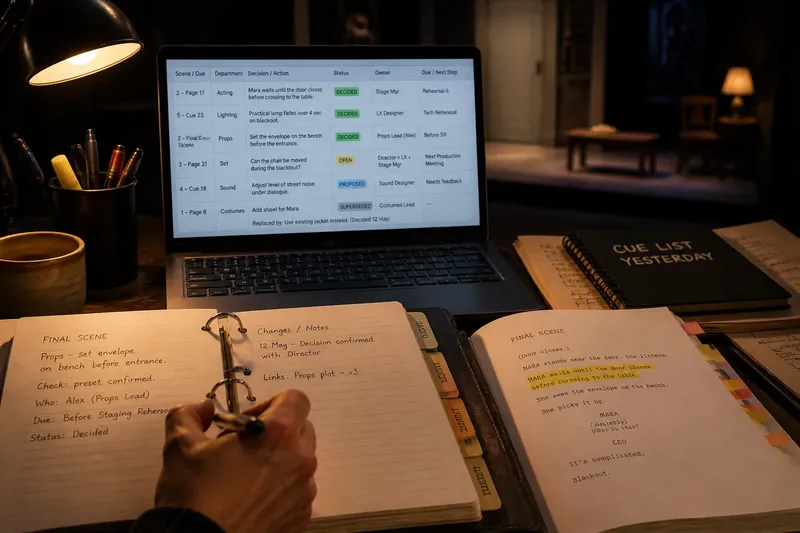
The stage manager updates the prompt book after rehearsal, while the lighting designer still has yesterday’s cue list and an actor remembers a different scene change. A shared production record gives the team one place to check what was agreed, what remains open, and who has the next action.
The prompt book remains the stage manager’s working document. The shared record tracks decisions that affect several people across acting, directing, design, and production. It does not need every rehearsal comment; it needs the current choices and their status.
Record clear decisions
When collaborators remember different versions of a staging choice, the cause is often simple: the decision was spoken aloud, then carried into separate notebooks, messages, or memories. Record an agreed choice in the shared document promptly, with enough detail for someone else to act on it.
- Check whether the entry names a scene, page, or cue; if it does, file it there, but if it does not, add the script or cue location before sharing it.
- Check whether the wording describes an observable action; if it does, keep it, but if it says only “make it more tense,” replace it with a specific direction such as “Mara waits until the door closes before crossing to the table.”
- Check whether the decision-maker has agreed to the choice; if so, mark it decided, but if not, label it proposed or open and name who must clarify it.
- Check whether the entry changes an earlier instruction; if it does, mark that instruction superseded and link the new entry, but if it does not, leave the current instruction unchanged.
- Check whether another person needs to act; if so, name the owner and a useful due point, but if no follow-up is needed, do not invent an assignment.
- Check whether the note includes private personnel matters; if it does, remove them and use the appropriate direct channel, but if it concerns production coordination, retain only the details needed to carry out the work.
Keep the wording neutral. “Mara waits until the door closes before crossing to the table” tells the team what to coordinate; a judgment about an actor’s performance does not belong in a shared production log.
Keep status visible
A crowded document can become a transcript in which proposals and settled choices look equally authoritative. Use a small set of labels such as proposed, decided, open, and superseded. Keep a proposal only if it needs a response or may help later, and mark a decision only after the person or group responsible for it has agreed.
For an open question, state what information or conversation is needed next. “Can the chair be moved during the blackout?” should remain open until the director and relevant design or stage-management colleagues settle the plan. If the answer depends on equipment, venue conditions, or safety requirements, consult the appropriate qualified person and applicable instructions rather than treating a note as authorization.
Organize for retrieval
File entries by the production detail a reader is likely to seek, not only by the day they were written. Use stable labels such as scene, page or cue, department, and status. Keep headings consistent and use the script’s scene names or established cue identifiers.
A shared spreadsheet can make entries sortable; a shared document may suit a team that prefers prose. Choose one main home and link to supporting files instead of copying the same detail in several places. That makes it easier to tell which record is current.
Say the team agrees that an envelope should be set on a bench before the final scene. The stage manager records “Final scene,” “Props,” “Decided,” and “Set the envelope on the bench before the entrance,” then names the person who will confirm the preset. Anyone searching by scene or department can find the choice and see who has the next action.
Preserve useful changes
When an instruction changes, write what changed, what it replaces, and who needs to know. Keep the current wording easy to spot. Preserve earlier wording only when it explains a meaningful change, and use the document’s version history as a backup rather than asking readers to reconstruct the decision from edit history.
Give updates a clear owner. The stage manager or another agreed coordinator can maintain the central record, while department leads supply changes in their areas. The coordinator organizes information; that role does not make them the approver of every artistic or departmental choice.
Assign follow-up work
“Add a chair” states an intention but may leave the team unsure who will confirm the chair, where it will come from, or when an answer is needed. Turn follow-ups into assignments with an owner and a useful due point, such as before the next staging rehearsal or for the next production meeting.
Use progress labels such as not started, in progress, and complete only if someone will keep them current. At the next check-in, close completed items and clarify anything that has stalled. Confirm ownership with the person, especially when work crosses departments; attendance at the decision is not consent to take on the task.
Set shared boundaries
Agree who can view and edit the record, where the current version lives, and how urgent changes will be communicated. Label proposals clearly so no one mistakes a possibility for settled direction. Keep personnel concerns and private conversations out of the production log.
Make the record easy to consult using tools the team already has. A shared folder with one clearly named current file can be simpler than several near-identical attachments. For a paper process, designate one current binder and a straightforward way to circulate updates.
How should teams use the record?
Should every rehearsal note go in?
No. Record choices that affect coordination, continuity, or another person’s next action, as well as open questions that need follow-up. Keep personal acting notes and passing suggestions with the people who need them unless the team agrees on a shared decision.
Who maintains the shared production record?
Choose one coordinator, often the stage manager, to organize the central version, and ask department leads to submit relevant updates. The coordinator can clarify wording without taking authority from the director or the person responsible for a department.
How should a changed choice appear?
Make the new instruction prominent, mark the old one superseded, and identify who needs the update. Add a short reason when it explains a practical consequence; a long account of the discussion is rarely useful for carrying out the current choice.
What if someone disagrees with a recorded decision?
Ask the relevant decision-maker to clarify the choice, then update the record with the agreed wording and status. Do not silently edit the shared file or add a competing instruction beside the existing one.
Make the record usable
A shared production record should work like a well-labeled tool drawer: the label helps the next person find the right item without guessing. Keep entries factual, make ownership visible, and remove clutter that hides current decisions. Check the record at coordination points so it stays aligned with the work onstage and behind it.
Start with a few fields: script or cue location, decision or question, status, owner, and follow-up. When collaborators need to know what the team agreed, where the choice applies, or who will act next, the shared production record should answer those questions directly.